Apple users operate under their Apple Accounts, where they can access all the features that make the company's devices convenient in the first place. That includes syncing photos, restoring backups, downloading apps, locating lost devices with Find My, subscribing to Apple services, and securely storing passwords across your hardware.
For years, Apple users operated on their Apple ID, the single login tied to their iPhone, AirTags, iCloud, App Store purchases, FaceTime, iMessage, Apple Music, Apple Pay, and more. In 2026, Apple transitioned over to Apple Account, though many people still call it Apple ID interchangeably.
If you’ve bought a new iPhone, added an iPad, or simply skipped setup years ago, creating or updating your Apple Account is easier than ever.
What is an Apple Account?
Your Apple Account is the login that powers nearly every Apple service. Think of it as your digital passport across Apple hardware. Sign in once, and your iPhone, iPad, Mac, Apple Watch, and even Apple TV are synced and work together.
Real-world examples of why having an Apple Account matters:
- Upgrading to a new iPhone: Your apps, photos, contacts, iMessages, and settings can be restored from an iCloud backup.
- Using multiple Apple devices: Start a note on your Mac and finish it on your iPhone.
- Lost your phone: Use Find My to locate, lock, or erase a device remotely.
- Buying apps or subscriptions: Purchases stay tied to your account.
- Password convenience: iCloud Keychain can autofill passwords securely across devices.
- Family Sharing: Share subscriptions, storage, and purchases with household members.
In short, an Apple Account turns separate devices into a connected ecosystem.
How to create an Apple Account
The easiest time to create an account is during the setup of a new iPhone or iPad. To create an Apple Account,
- Turn on your new iPhone or iPad.
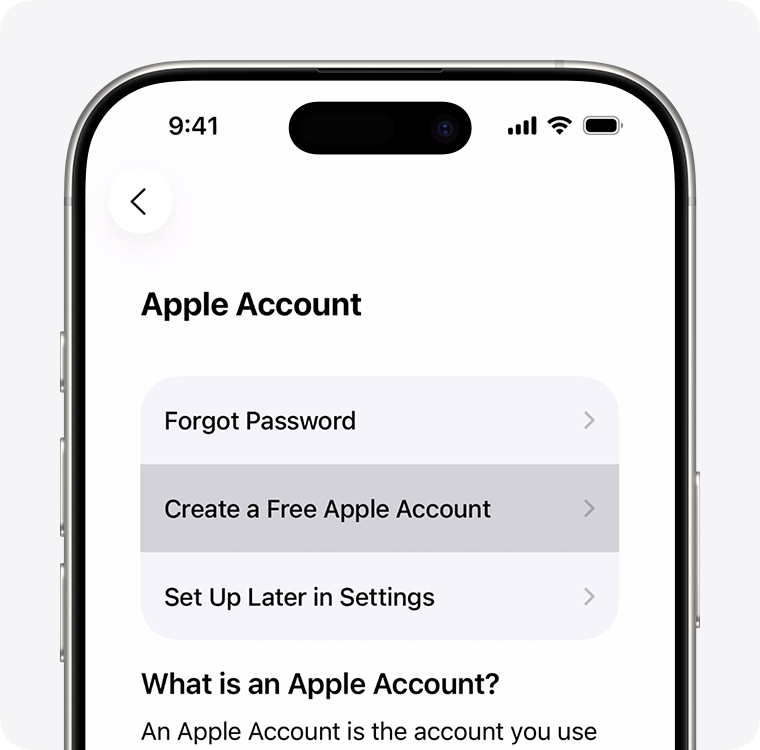
- During setup, you’ll reach the Apple Account sign-in page.
- Tap Forgot password or don’t have an Apple Account?
- Tap Create a Free Apple Account.
- Enter your:
- First and last name
- Birth date
- Email address (or create an iCloud email)
- Create a strong password.
- Enter your phone number for verification.
- Set up two-factor authentication.
- Follow the prompts to finish setup
Why two-factor authentication matters
I wholeheartedly encourage everyone to set up two-factor authentication (2FA). This adds an extra layer of security. Even if someone gets your password, they still need a verification code sent to your trusted device or phone number. Without a 2FA code, they'll be unable to access your Apple Account or any information associated with it.
In 2026, this is one of the most important steps during setup.
Create an Apple Account after setup
If you skipped setup earlier, you can still make one later.
On iPhone or iPad:
- Open Settings.
- Tap Sign in to your iPhone.
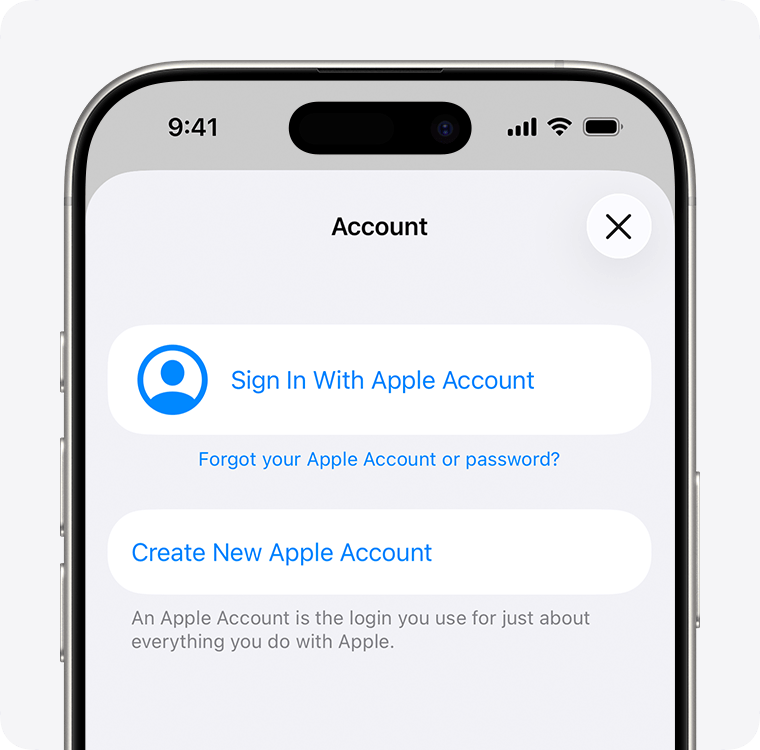
- Select Don’t have an Apple Account?
- Tap Create Apple Account.
- Follow the prompts.
On the web:
- Visit Apple’s account portal.
- Select Create Your Apple Account.
- Enter your information.
- Verify your email or phone number.
- Finish setup.
Once done, you can sign into all Apple services with the same credentials.
How to update or change your Apple Account email
Maybe at some point throughout your tenure within the Apple ecosystem, you've switched email providers, lost access to an old inbox, or simply want a cleaner address attached to your Apple Account. The good news is that changing your Apple Account email usually doesn’t erase purchases, backups, or subscriptions.
Change Apple Account email on iPhone or iPad
- Open Settings.
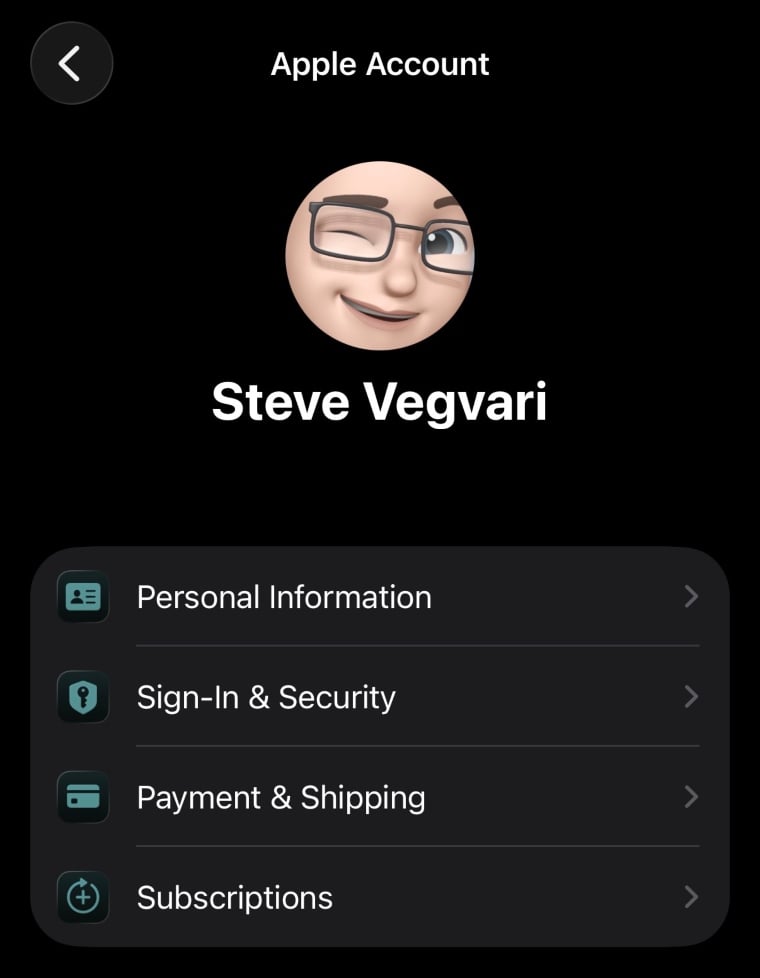
- Tap your name at the top.
- Tap Sign-In & Security.
- Tap Email & Phone Numbers.
- Tap Add Email or Phone Number.
- Add your new email.
- Verify the new address.
- Remove the old email if desired.
Change your Apple Account email online
- Sign in to Apple’s account management page.
- Select Sign-In & Security.
- Choose Email & Phone Numbers.
- Add a new address.
- Verify it.
- Remove your old one.
As long as you’re signed into the same account, your purchases and data remain linked.
How to recover or reset a forgotten Apple ID
Forgetting your Apple Account login is, sadly, pretty common, especially if you haven’t upgraded your devices in years. Thankfully, not all hope is lost if you believe you've forgotten your login credentials.
If you forgot your Apple Account email, you can try using the email addresses you commonly use. You can also check Google or another browser's password manager to see if your Apple Account password was saved. Apple may also allow you to use your phone number to recover your account information.
You can also use Apple’s recovery tools to identify your account. Keep in mind that as a worst-case scenario, if you're unable to recover your credentials, you can factory reset your iPhone and start fresh with a new Apple Account.
If you forgot your password
- On iPhone, tap Forgot password? on the login screen.
- Enter your email or phone number.
- Verify your identity.
- Create a new password.
If you have a trusted Apple device already signed in, recovery is much faster. If you’re locked out entirely, Apple may require Account Recovery, which can take time while ownership is verified. This is why keeping trusted passwords and numbers up to date matters.
Apple Account: FAQ
What is the difference between an Apple Account and an Apple ID?
Functionally, they are the same login. Apple increasingly uses the name Apple Account, while many users still say Apple ID.
Is there a way to change my Apple ID without losing everything?
Yes. If you update the email tied to the same account, your purchases, subscriptions, photos, and backups usually remain intact.
Is my Apple ID my email address?
Often yes. Many users sign in with an email address, though some can also use a trusted phone number.
Can I change my Apple ID without losing anything?
In most cases, yes, as long as you are editing the existing account rather than creating a brand-new one.
Steve Vegvari

Steve Vegvari is a 10-year writer in the gaming and tech space, writing for several Canadian publications. He's covered everything from the latest marquee games and hardware to smartphones, smart home devices, TVs, and smart lights. Steve emphasizes his love of weird, experimental tech while uncovering the pros and cons of the Canadian mobile market.
Find a better phone plan
Thousands of cell phone plans unpacked. All the facts. No surprises.

Related Articles


Find Better Phones and Plans
Hundreds of cell phone plans unpacked. All the facts. No surprises.